
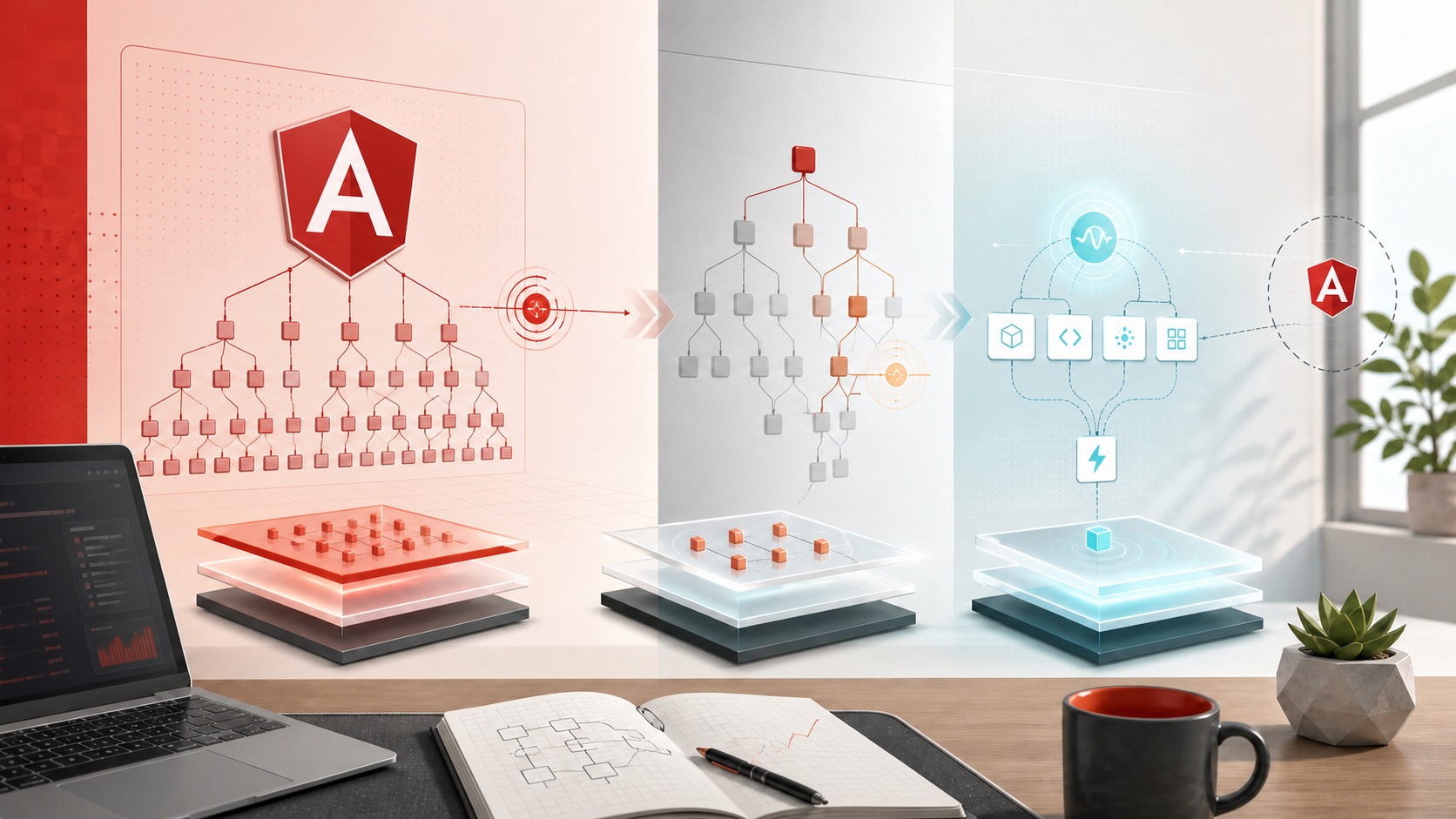
Angular’s Change Detection Shift: What Changed from v17 to v22
A practical look at how Angular moved from app-wide Zone.js-driven checks toward OnPush, signals, and the path to zoneless change detection.
After working with Angular for about five years, one thing is very clear to me: the biggest Angular story in the last two years has not been syntax. It has been reactivity and rendering control.
Angular used to lean heavily on Zone.js plus the default change detection strategy. That model worked, but it also made large applications pay for a lot of checks they did not really need. From Angular 17 onward, the framework kept moving toward a more explicit and more optimizable model: OnPush, signals, and eventually zoneless change detection.
This post is not a full zoneless deep dive yet. I am saving that for the next episode. This one focuses on the bridge:
- How default change detection actually works.
- Why it becomes expensive in large trees.
- How
OnPushhelped us control the blast radius. - What usually triggers change detection in Zone-based Angular apps.
- How signals changed the direction of the framework.
Why this topic matters
If you are maintaining Angular 14, 15, 16, 17, 18, or 19 applications today, you are very likely still living in a world shaped by:
Zone.js- default change detection
- RxJS-heavy state flows
- manual performance tuning with
OnPush
Even if Angular is moving further toward signals and zoneless execution, most real enterprise applications are migrating gradually, not all at once. That is why understanding the old model is still valuable.
The short timeline: what changed in the last two years
Here is the version-level shift that matters for this topic:
- May 22, 2024: Angular v18 shipped broader signals momentum and experimental zoneless support. The official docs and release material started making the new reactivity direction much more visible.
- November 19, 2024: Angular v19 continued that path while improving the broader rendering and hydration story.
- May 28, 2025: Angular v20 pushed the framework further into signal-first APIs.
- Q2 2025: Angular roadmap update marked the fundamental reactivity primitives such as
signal,effect,linkedSignal, signal inputs, and signal-based queries as stable in Angular v20. - Q4 2025: Angular roadmap update marked zoneless Angular as stable as of Angular v20.2.
- June 3, 2026: Angular v22 moved new applications even further by making
OnPushthe default strategy for new components according to the current docs.
That is a major philosophical change. Angular is no longer only saying, "we can optimize change detection." It is saying, "the optimized path is becoming the normal path."
How default change detection works
Let us start with the old mental model.
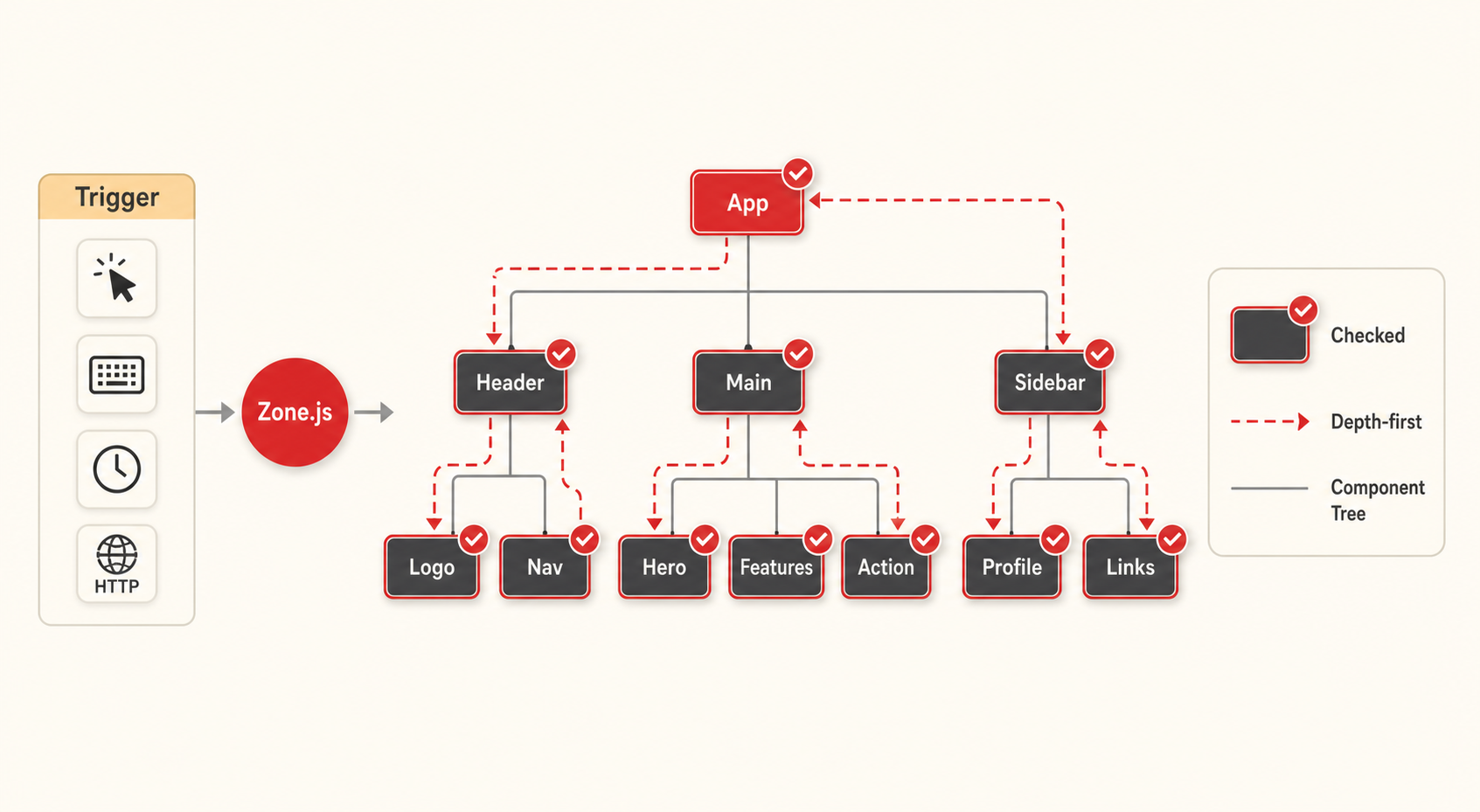
In a classic Zone-based Angular application, the framework is notified whenever something might have changed. Then Angular starts a change detection pass from the top of the application tree and walks through component views to see what needs to update.
The important part is this: with the default strategy, the framework behaves as if many parts of the tree may need checking after common application activity.
From Angular’s current documentation:
- the default mode checks whether the DOM needs updates whenever application-wide activity may have happened
- those activities include things like user interaction, network responses, timers, and more
That is why the strategy feels simple but broad.
Think of it as a depth-first tree walk
When I explain this to junior developers, I usually say:
- Angular starts near the root.
- It walks down the tree.
- It evaluates bindings in each view it visits.
- In large apps, that means a lot of component nodes can be touched even if only one small piece of state changed.
The exact internal implementation details are more nuanced than a classroom DFS example, but this is the right performance intuition for most teams: a trigger near one part of the app can still lead to a broad tree check.
What usually triggers change detection in Zone-based Angular apps
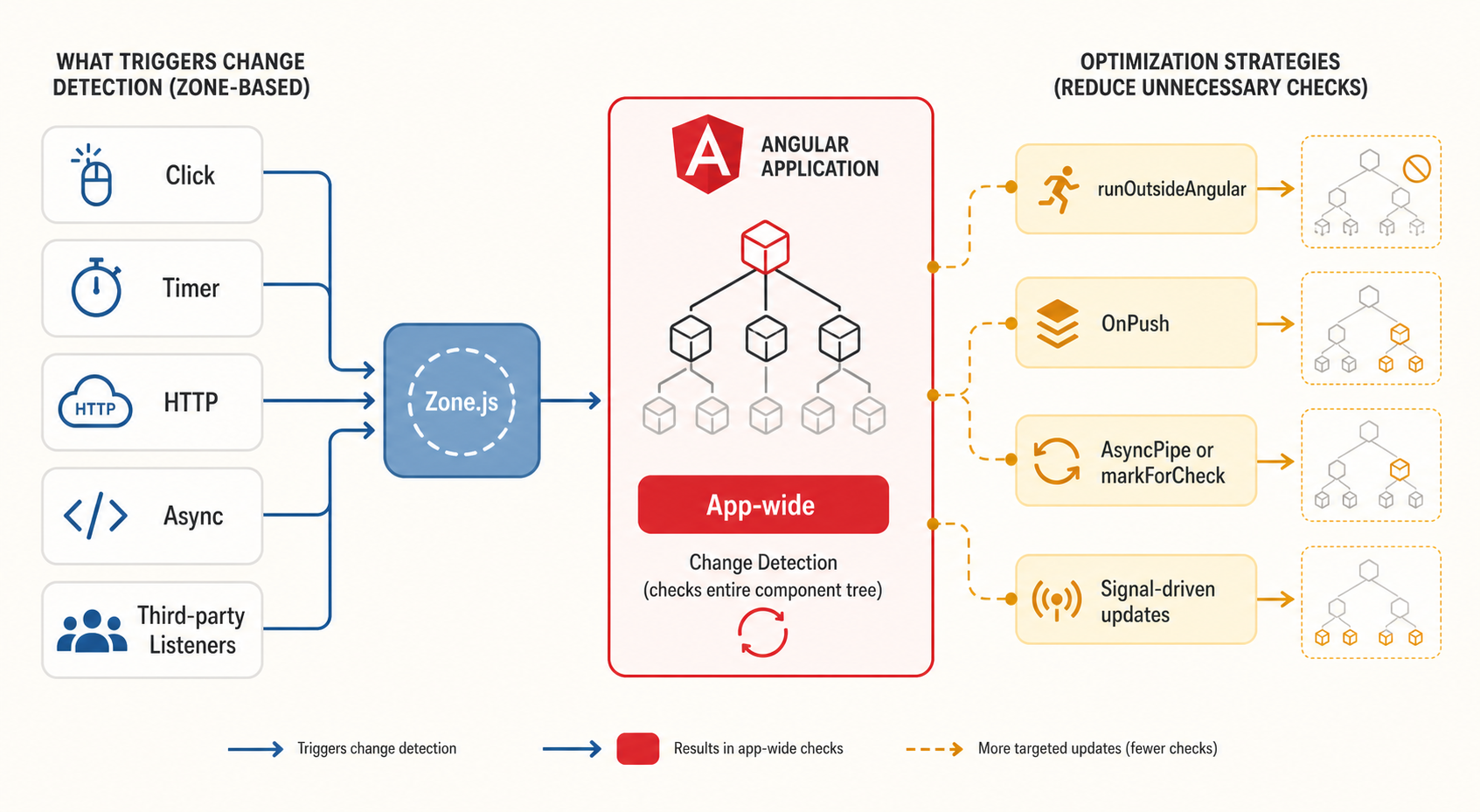
In legacy or traditional Angular applications, Zone.js acts as the signaling layer. The Angular docs describe it as the mechanism that captures asynchronous operations and tells Angular that application state might have changed.
The common triggers are:
- user clicks and DOM events
- timers such as
setTimeoutandsetInterval - HTTP completions
- promise or microtask completions
- third-party libraries that attach listeners or schedule async work
This is where many teams first felt performance pain. Not every async task changes useful UI state, but the framework still gets notified and may run another round of checks.
Why default strategy becomes expensive
Default change detection is not "bad." It is predictable and productive, especially in small or medium apps.
The problem appears when all of these become true at the same time:
- the component tree is large
- some lists or dashboards update frequently
- third-party widgets schedule a lot of async work
- state updates are noisy
- several components do non-trivial template work
At that point, the real issue is not one single change detection cycle. It is the frequency of broad checks over time.
That is why Angular’s performance story historically moved toward subtree skipping.
OnPush was the practical solution for big Angular apps
Before signals became the main conversation, OnPush was the best performance lever most teams could use safely.
The idea is simple:
- do not treat the whole subtree as always needing checks
- only check the subtree when Angular has a strong reason
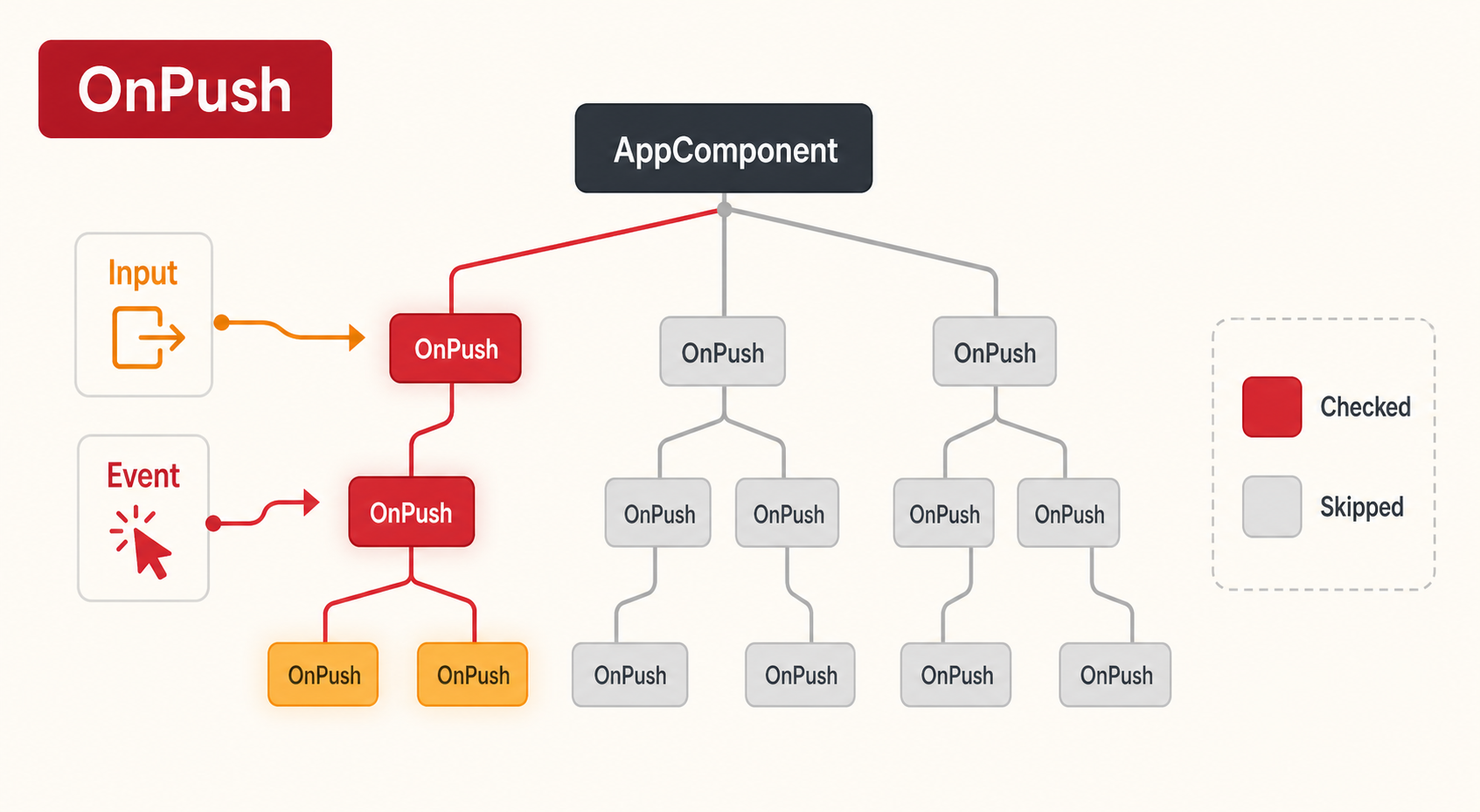
According to the Angular docs, OnPush checks a subtree when:
- the subtree root receives a new input from template binding
- Angular handles an event in that subtree
- the component is explicitly marked for check, for example with
ChangeDetectorRef.markForCheck
That is a huge shift in behavior. Instead of app-wide eagerness, you get targeted work.
The real value of OnPush
In day-to-day enterprise work, OnPush gave us three important benefits:
- Performance boundaries. One noisy area of the UI became less able to wake the whole application tree.
- Better state discipline. Teams had to think more carefully about input changes, immutability, and where updates come from.
- A better migration path. Once a component was already
OnPushfriendly, it became much easier to move it toward signals and later toward zoneless operation.
This is why I see OnPush less as a one-off optimization and more as a design habit.
Important OnPush edge cases teams often miss
This is where many developers get confused the first time they adopt it.
1. Mutating an object does not help if the reference stays the same
If a parent passes an object input and you mutate a nested property without changing the object reference, Angular may not treat that as a new input for OnPush.
That is expected behavior.
2. Manual input changes in TypeScript do not automatically trigger checks
Angular’s docs explicitly call out cases where you get a component reference with @ViewChild or @ContentChild and then mutate an @Input manually. In that case, Angular will not automatically schedule an OnPush check for you. You may need markForCheck().
3. Events inside an OnPush subtree still matter
Some teams assume OnPush means "this subtree is frozen unless an input changes." That is not true. If Angular handles an event inside that subtree, it can still run change detection for that branch.
How we optimized legacy Angular applications before signals
For older Angular versions, or for large codebases that still use Zone-based apps today, these are still the highest-value techniques:
1. Use OnPush on presentational and list-heavy components
This is usually the biggest win because it reduces unnecessary checks across large subtrees.
2. Prefer immutable input updates
Instead of mutating existing objects or arrays, create new references when the UI should react. That makes OnPush behavior more predictable.
3. Use AsyncPipe instead of manual subscriptions in templates
AsyncPipe integrates cleanly with Angular’s change detection model and also marks views appropriately when new values arrive.
4. Move noisy non-UI work outside Angular’s zone
Angular’s official performance guidance recommends NgZone.runOutsideAngular() when a timer, third-party library, or repeated async process does not need to trigger UI checks every time.
Typical examples:
- animation loops
- polling timers
- third-party widgets attaching many listeners
- analytics or tracking work
5. Profile zone pollution instead of guessing
Angular DevTools can show repeated change detection bars caused by timers, event handlers, or third-party behavior. That gives you a direct signal that the app is paying for checks it did not really need.
6. Reduce template work in hot paths
Even good change detection strategy can still feel slow if each checked component does expensive work in bindings.
For older applications, this often means:
- avoid calling heavy functions from templates
- break large views into better-bounded components
- stabilize list rendering patterns
Where signals changed the story
Signals changed Angular’s direction because they gave the framework a much more granular way to understand what depends on what.
Angular’s official signals guide describes them as a system that tracks how and where state is used so Angular can optimize rendering updates more precisely.
That matters because it moves the framework away from the older mental model of:
- "something async happened"
- "better check a lot of the app"
and closer to:
- "this state changed"
- "these consumers depend on it"
- "mark the right places"
Angular’s docs also note that when you read a signal in an OnPush template, Angular tracks that dependency and automatically marks the component when the signal changes.
That is one of the most important bridge ideas in modern Angular:
signals and OnPush work very well together
Signals did not just add another state primitive. They made targeted updates feel more native inside the framework.
Why this leads naturally to zoneless Angular
Once Angular can rely more on explicit reactivity and better update notifications, it needs less help from Zone.js.
The current zoneless guide says Angular can determine when to run change detection using framework-level notifications such as:
markForCheckComponentRef.setInput- updating a signal that is read in a template
- bound template or host listeners
The roadmap shows how this matured over time:
- zoneless support shipped experimentally in Angular v18
- zoneless Angular became stable as of Angular v20.2
- Angular v22 documentation now treats
OnPushas the default strategy for new components
That is a very strong signal about where Angular wants teams to go next.
My practical takeaway after five years with Angular
If I were explaining Angular performance strategy to a team today, I would put it like this:
- understand the default model because many production apps still depend on it
- use
OnPushto create clean component boundaries - eliminate zone pollution in noisy areas
- adopt signals where local UI state benefits from precise tracking
- treat zoneless as the destination, not the first migration step
That migration order is much less risky than trying to jump directly from a large legacy Angular app to a fully modern reactive architecture in one release.
What this means for the next post
This article is the setup.
The next episode will focus on signal-based, zoneless Angular architecture:
- how a signal-first component model changes state design
- how zoneless apps decide when to render
- what migration patterns feel realistic in enterprise projects
- where signals genuinely simplify UI code and where they do not
Further reading
These official Angular resources are worth reading alongside this post: